llm-d
Using llm-d on OpenShift
What is it?
llm-d is a Kubernetes-native framework that speeds up distributed LLM inference at scale. It is able to orchestrate several model server pods, allowing key optimisations so you can serve high scale production traffic efficiently and reliably.
How does it work?
The core components can be seen in the architectural diagram below1.
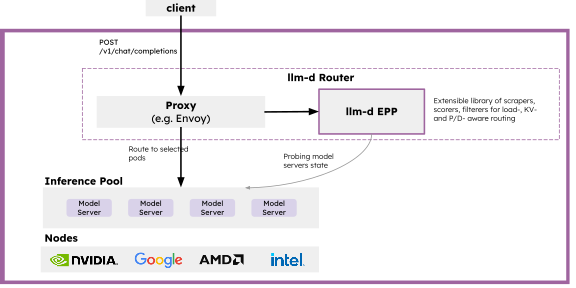
- llm-d Router: The entrypoint for all inference requests.
- Proxy: Accepts user requests, and determines the optimal destination model server based on the end point picker (EPP).
- llm-d end point picker (EPP): The engine that will score and select model servers based on real-time metrics, KV-Cache affinity and other policies.
- Inference pool: Defines a group of model servers that share the same model and compute configuration. This is the discovery target for the router.
With these components, several key optimisations can be configured to significantly speed up inference requests, including:
- Prefix cache locality - Requests can be routed to model server replicas that already have relevant KV-cache entries, reducing the latency by removing unnecessary prefill computation.
- KV-cache utilisation - Requests are routed to model server replicas with more available memory.
- Queue depth - Allows avoidance of overloaded / busy replicas.
Quick Installation on OpenShift
Quick installation can be performed by following the OpenShift AI documentation
Additional information:
Additional info surrounding the installation and usage of llm-d can be followed here:
Advanced configuration
llm-d Flow Control
Overview
llm-d Flow control is a configuration in the Endpoint Picker (EPP) that manages request queuing, prioritization and fairness in a multi-tenant inference serving environment. This configuration is particularly interesting when you have many tenant applications with different priorities and SLAs. With this, workloads can be prioritised over others to ensure maximum GPU utilisation, without affecting critical workload requests.
This works by injecting the request with headers so the EPP's dispatch logic can follow priority order, ensuring higher-priority requests dispatch before lower-priority requests. For requests in the same priority level, there's a fairness policy that determines which requests are executed on.
A saturation check will monitor the inferencePool. If saturation >=1, dispatching of requests will be halted and all requests will wait in their respective priority queues. Once capacity is available, the request will be scheduled to the specific model server.
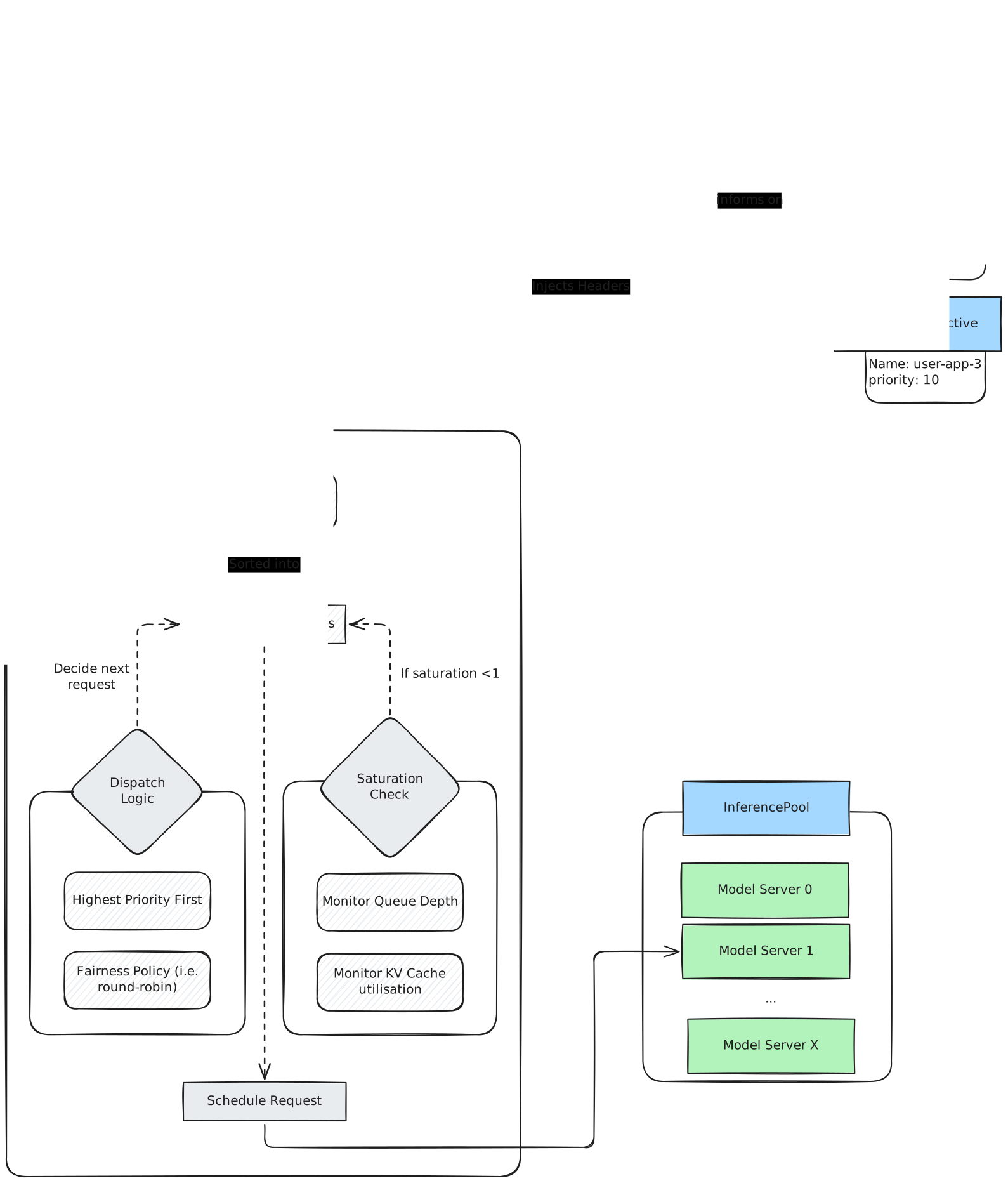
Each request is injected with 2 headers by the Gateway's authPolicy.
-
x-gateway-fairness-id- Groups requests from the same authentication source. -
x-gateway-inference-objective- Defines a priority by matching to aninferenceObjectiveobject.
The prioritisation is determined by the authorization token in the request. This means that you must have enabled token-authorization for your llm-d model deployment. From this token, the user and namespace that the request is coming from can be found, which is required for setting these headers.
The x-gateway-inference-objective header is given a value based on 3 sources of tokens:
-
User Tokens (i.e.
oc whoami --show-token). This will set the header toauthenticated. -
Anonymous Tokens. This will set the header to
unauthenticated. -
ServiceAccount Tokens (i.e.
oc create token <sa-name> --duration=<duration>). This will set the header to the serviceAccount's namespace.
Configuration
Note
llm-d's flow control relies on an Authorization token in the request headers. Ensure you have enabled auth for your llm-d llmInferenceService.
Flow control is configured from the llmInferenceService object, specifically in the EndpointPickerConfig section.
apiVersion: serving.kserve.io/v1alpha2
kind: LLMInferenceService
...
spec:
  ...
  router:
    ...
    scheduler:
      config:
        inline:
          apiVersion: inference.networking.x-k8s.io/v1alpha1
          kind: EndpointPickerConfig
          featureGates:
            - "flowControl"
          saturationDetector:
            queueDepthThreshold: 5
            kvCacheUtilThreshold: 0.8
            metricsStalenessThreshold: 200ms
-
queueDepthThreshold: Specifies the queue depth threshold on model servers. This refers to the number of requests in a queue of a specific model server. This number is a trade off between shortening waiting time in the queue (by setting the number lower), and having a higher maximum throughput when batching requests many. -
kvCacheUtilThreshold: The maximum utilisation of the KVCache, from 0.0 - 1.0. The default 0.8 refers to an 80% threshold. -
metricStalenessThreshold: Specifies how long stale metrics are still considered valid.
Optionally, you can configure advanced flow control settings within the same EndPointPickerConfig.
...
      config:
        inline:
          apiVersion: inference.networking.x-k8s.io/v1alpha1
          kind: EndpointPickerConfig
          featureGates:
            - "flowControl"
          plugins:
            - type: fcfs-ordering-policy
            - type: round-robin-fairness-policy
          flowControl:
            ...
            priorityBands: ## For each priorityBand / inferenceObjective you make.
            - priority: 1
              orderingPolicyRef: fcfs-ordering-policy
              fairnessPolicyRef: round-robin-fairness-policy
For each priorityBand (identified by the priority value), you can specify the orderingPolicyRef and the fairnessPolicyRef.
-
The
fairnessPolicyis how to prioritise requests from different tenants, within the samepriorityBand. The default value (global-strict-fairness-policy) can cause the "noisy neighbour" problem within the priorityBand. Setting this toround-robin-fairness-policywill isolate the tenants better and ensure an equitable service for both tenants. -
The
orderingPolicydetermines how requests are queue within a specific flow. The default is First Come First Served (FCFS).
For each priorityBand, you'll also need to create an inferenceObjective. These need to be created in the same namespace as your llmInferenceService object.
apiVersion: inference.networking.x-k8s.io/v1alpha2
kind: InferenceObjective
metadata:
  name: <name>
  namespace: <llmisvc-namespace>
spec:
  priority: 100
  poolRef:
    group: inference.networking.k8s.io
    kind: InferencePool
    name: <llmisvc-name>-inference-pool
inferenceObjective must be one of:
-
The namespace of the serviceAccount whose token will be used to inference with the model.
-
authenticated, for user tokens. -
unauthenticated, for anonymous requests.
All inferenceObjectives for a given llm-d deployed-model, need to be created within the same namespace as your llmInferenceService object.
A higher priority value means a higher priority request.
Try it yourself
In this repo there's a helm chart to deploy an llm-d inference service, with flow control configured. More information on required configuration is in the README.md.
Appendix
- RHOAI Docs - Enabling auth for an LLM InferenceService
- RHOAI Docs - Managing mixed workloads with priority queuing
-
Image retrieved from the llm-d documentation. ↩